 Canada (English)
 Colombia
 Caribbean and Puerto Rico
 Ecuador
 India
India
 Indonesia
 Ireland
 Malaysia
 Mexico
 Panama
 Peru
Peru
 Philippines
 Singapore
 South Africa
 Sri Lanka
 Thailand
 United Kingdom
 United States
 AcumatiCares
Introduction to Job Cost Accounting in Construction
Financial accounting tracks company-wide revenue and expenses for reporting and compliance.
Job cost accounting (often called construction project costing or construction project accounting) tracks costs and billings at the project and cost-code level so teams can see profitability as work happens, not weeks later.
In practice, job costing organizes spending into direct and indirect categories, typically labor, materials, equipment, subcontractor/trade partner costs, and overhead, then compares actuals to the estimate to flag issues early and improve future bids.
In this guide, we’ll define job cost accounting for construction companies, break down the core components, and outline implementation best practices, including how construction accounting software and ERP workflows (like Acumatica) support accurate, timely project financials.
What is Job Cost Accounting in Construction?
Construction projects are multi-layered and complex. They must meet each customer’s specific location, resource, and labor needs—factors which also determine each project’s budget.
With job cost accounting, which is equivalent to project accounting in other industries, business leaders have a complete view of construction project-related costs. These costs are used to build a concise project budget and identify inefficiencies and excess costs.
Quantity Takeoff vs. Job Costing
Quantity takeoff (QTO) supports estimating by calculating quantities and expected costs before work begins. Job costing starts after award and tracks what you actually spend and bill during execution. In other words, QTO helps build the estimate; job costing validates it, explains the variance, and improves the next bid.
When estimating and job costing use the same cost code structure, teams can compare estimated vs. actual costs consistently and pinpoint which scopes, crews, materials, or subcontractors are driving overages.
Key Components of Job Cost Accounting
Understanding the key components of job cost accounting begins with understanding how construction projects evolve.
Capture job costs by project and view labor, time, and material cost changes in real-time. Automate change order processes to control job cost overruns.
New construction projects begin with gathering potential customers’ project information. Based on their requests, the construction firm creates a cost estimate and prepares a complete bid package. This package highlights the total cost to complete, contracts, budgets, sub-jobs, and the schedule of values.
Here’s a look at what’s included in the total cost to complete:
- Direct expenses (e.g., equipment rentals, utilities, temporary office structures, and project-related salaries)
- Indirect expenses/overhead costs (e.g., insurance, office/rent, marketing, and employee expenses for all projects within the firm)
- Labor (e.g., employee and subcontractor wages along with administrative expenses)
- Materials (e.g., lumber, steel, concrete, plumbing fixtures)
- Equipment (e.g., excavators, cranes, bulldozers)
These total cost to complete expenses are also the key components of job cost accounting.
Why Job Costing Matters for Construction Profitability and Cash Flow
Budgeting and Cost Control
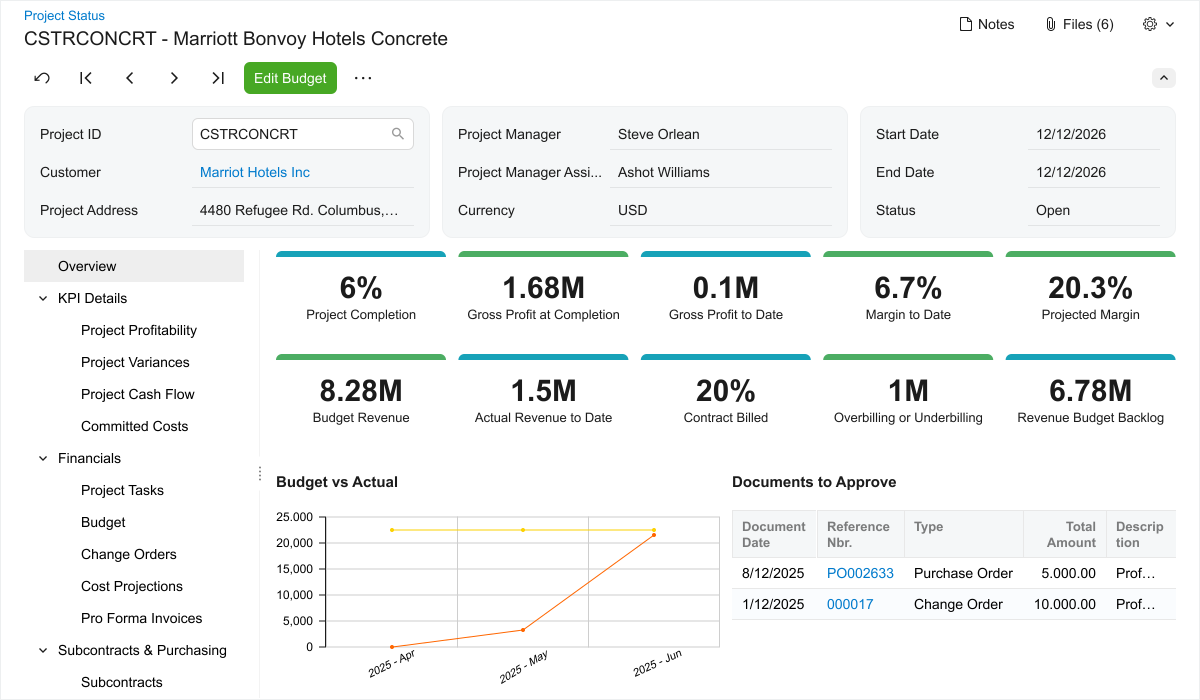
A project budget sets the baseline for construction project costing, but job costing is what keeps it credible as work changes. Best practice is to manage three numbers at all times:
- Budget (original estimate plus approved changes)
- Committed cost (open POs, subcontracts, and other obligations)
- Actual cost (posted time, bills, receipts, equipment usage)
Monitoring budget vs. committed vs. actual by cost code helps teams detect overruns early, before they show up as a margin surprise at closeout.
Profitability Analysis
Profitability improves when contractors continuously compare actuals to the estimate, not just at month-end. Job costing makes it possible to:
- Validate estimating assumptions by scope and crew
- Explain variance (productivity, price, waste, rework, weather, sequencing, scope changes)
- Improve future bidding, estimating, and target margins using historical actuals from similar work
Types of Accounting Used in Construction
Construction firms rely on both:
Financial accounting – to produce company-wide statements, compliance reporting, and cash management
Job cost accounting – to manage project execution, including budget performance, billing, and cost forecasting at the job and cost-code level
The two functions work best when they share the same underlying transactions. When time, purchasing, inventory, and AP activity are connected to the job in one system, finance and operations can align on project profitability and cash flow using the same source of truth, rather than reconciling disconnected spreadsheets or standalone tools.
Together, general and job cost accounting let business leaders and project managers know how well their company is performing and provide the information they need to become—and remain—profitable. But to reap these impressive and vital accounting benefits, businesses must implement the right job costing software.
Best Practices for Implementing Job Cost Accounting
Choosing the Right Accounting Software for Job Cost
Many contractor job costing software tools handle only parts of the workflow. As contractors grow, job costing is easier to manage when job, financials, and operations share the same data and cost structure.
ERP-based construction accounting software (like Acumatica) supports this by connecting project budgets, purchasing, inventory, time capture, and billing.
When evaluating a job costing solution for construction projects, look for features that support day-to-day control, not just reporting:
- Cost codes and budget versions aligned to estimating and the schedule of values
- Committed cost tracking (POs, subcontracts) alongside actuals
- Field-to-office cost capture (mobile time, receipts, material issues) to improve accuracy
- Change order controls that update budget, forecast, and billing as soon as scope changes are approved
- Role-based dashboards that highlight variance and potential overruns by cost code
- Flexible billing support (progress, T&M) and visibility into retainage and cash flow
These capabilities reduce manual allocation errors and improve visibility into costs before they become margin erosion.
Acumatica’s Construction Management Software is designed to provide real-time insights so project teams can manage budgets, change orders, and project accounting from one place.
Acumatica’s Construction Management Software provides real-time insights that enable project managers to stay on top of every project and budget. As a single source of truth, Acumatica empowers users to manage customer relationships, project operations, change orders, financials, and project accounting needs from one place—anywhere, at any time, from any device. And employees in the office and in the field enjoy an accurate, up-to-date snapshot of every project.
“With Acumatica Construction, we have access to current data that helps us understand where our business is coming from, how profitable it is, and just where it stands at any point in time,” says Acumatica customer Eric Hugunin, COO, Phoenix Renovation and Restoration. “It’s not a coincidence that, since going live on Acumatica, we haven’t needed to tap into our line of credit in 14 months, and we are operating cash flow positive for the longest period in 22 years.”
Integrate Job Costing with Real-time Field Data
Job costing is only as accurate as the transactions feeding it. Integrating job cost accounting with real-time data improves project financial accuracy by reducing lag and rework in cost allocation. Examples of high-impact integrations include:
- Time and expense entry tied to job, phase, and cost code (including crew-level detail)
- Purchasing and material receipts that post to the job as soon as items are received
- Equipment usage captured daily and applied consistently (rate-based or actual)
- AP coding standards so subcontractor and vendor bills land in the correct cost bucket the first time
This is where a unified ERP approach helps: the same job structure can be used across time, purchasing, inventory, AP, and billing so teams do not have to reconcile multiple systems.
Change Orders and Scope Controls to Protect Margin
Change orders affect job costing in two ways: they change the budget (cost) and the contract value (revenue). Controls should ensure that:
- Potential changes are logged early (pending vs. approved)
- Budget revisions are tied to approved scope, with auditability
- Forecasts (cost-at-completion) reflect the latest assumptions
- Billing follows approved terms and updated schedule of values
A consistent workflow prevents teams from absorbing out-of-scope work without visibility, which is a common driver of cost overruns.
Operations and Finance Collaboration Rhythms
Job costing works best when operations and finance share a weekly cadence:
- Operations reviews production and cost code performance and flags risks
- Finance confirms posting accuracy (time, AP, receipts) and monitors committed costs
- Both agree on forecast updates and the change order status that impacts margin and cash flow
This collaboration improves visibility into project profitability and reduces end-of-month surprises.
Common Site-level Implementation Challenges (and Mitigations)
Contractors often face predictable challenges when implementing job costing on active sites: inconsistent cost code usage, late timecards, missing receipts, and after-the-fact reclassifications. Mitigations include:
- Standardized cost code lists tied to estimating
- Simple field entry workflows (mobile-first where possible)
- Clear responsibility for coding (who codes what, when)
- Weekly exception reports (uncoded time, unmatched receipts, mis posted AP)
- Training by role so foremen, PMs, and accounting teams each know what “good data” looks like
Training and Process Integration
Implementation succeeds when job costing standards are defined before training begins. Establish: the job/phase/cost code structure, who codes which transactions, and how change orders update budget and billing. Then train by role (field, PM, accounting) using real project examples.
Acumatica customers can work with implementation partners and use Acumatica Open University and the Customer Portal to support adoption and process consistency across office and field teams.
Having training and support services at their fingertips means construction businesses can train their teams quickly and easily on how to harness job cost accounting principles and integrate them with their existing processes.
Conclusion
Acumatica’s cloud-based ERP solution and native job costing software enable construction professionals to automatically capture labor, material, and equipment costs and report on them in one, comprehensive solution. Staying on budget, creating accurate and timely bid packages for prospective projects, and solidifying customer relationships have never been easier or more enjoyable.

Says Elizabeth Barratt, Manager of Project Excellence at Ask Afrika, “Acumatica works perfectly. It handles project accounting, cash flow, and project monitoring, but Acumatica is not confined to project-based operations. Other departments like sales and marketing love it as well.”