
 Canada (English)
 Colombia
 Caribbean and Puerto Rico
 Ecuador
 India
India
 Indonesia
 Ireland
 Malaysia
 Mexico
 Panama
 Peru
Peru
 Philippines
 Singapore
 South Africa
 Sri Lanka
 Thailand
 United Kingdom
 United States
 AcumatiCares


Managing business finances with disconnected tools only works for so long. As a business grows, spreadsheets pile up. Reports, put together by different people with inconsistent data, start contradicting each other. Month-end close stretches over weeks. In short, the basic accounting software that once got the job done starts creating more problems than it solves.
A modern ERP finance module addresses these challenges by connecting accounting and financial management with the operational activity behind the numbers. Purchases, customer invoices, inventory movements, payroll, projects, and other transactions can update the appropriate financial records without requiring teams to re-enter the same data across disconnected systems.
This guide explains what an ERP finance module is, how it supports growing businesses, which features finance teams should evaluate, and what questions buyers should ask before selecting a system.
Key Takeaways
- An ERP finance module connects accounting and financial management with the business activity behind the numbers.
- Common capabilities include general ledger, accounts payable, accounts receivable, cash management, reporting, budgeting, fixed assets, tax management, and financial controls.
- Growing businesses often evaluate ERP when spreadsheets, manual reconciliations, slow closes, disconnected systems, and limited cash visibility become difficult to manage.
- The right ERP finance module should fit the organization’s reporting requirements, entities, currencies, compliance needs, integrations, growth plans, and implementation capacity.
- Buyers should evaluate how features work together—not simply compare the length of competing feature lists.

What Is an ERP Finance Module?
An ERP finance module manages and automates a company’s accounting and financial management processes. It serves as the financial hub of a broader ERP system, collecting transactions from across the business and organizing them into a consistent, up-to-date view of financial performance.
Common capabilities include general ledger, accounts payable, accounts receivable, cash management, fixed assets, tax management, budgeting, financial reporting, revenue recognition, and audit controls. The exact capabilities vary by platform and by the needs of the organization.
Unlike standalone accounting software, an ERP finance module connects financial transactions with operational activity. For example, a purchase receipt can update inventory and accounts payable, while a customer shipment can initiate invoicing and update revenue-related records. This connectivity reduces duplicate data entry and helps finance teams trace financial results back to the transactions that produced them.
Finance module flow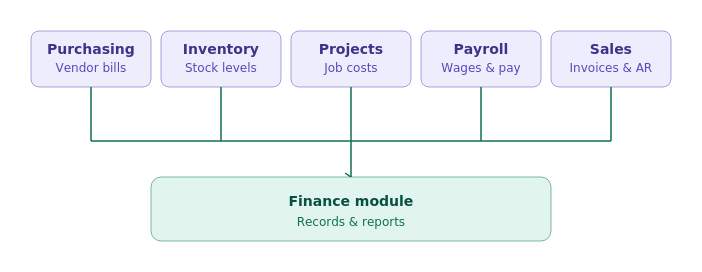
How Is an ERP Finance Module Different from Accounting Software?
Accounting software and ERP finance modules both support core accounting processes. The primary difference is the scope and connectivity of the system. Accounting software generally focuses on financial transactions, while an ERP finance module connects financial management with operational processes across the business.
| Evaluation Area | Standalone Accounting Software | ERP Finance Module |
|---|---|---|
|
Primary Scope |
Accounting and bookkeeping | Financial and operational management |
|
Business Data |
Often maintained across separate applications | Connected across ERP processes |
|
Automation |
Primarily accounting tasks | Workflows spanning finance and operations |
|
Reporting |
Primarily historical financial reporting | Financial and operational reporting with drill-down |
|
Complexity |
Best suited to relatively straightforward requirements | Supports entities, locations, currencies, projects, and more complex workflows |
|
Scalability |
May require additional applications as the business grows | Designed to support broader operational growth |
What Are the Benefits of an ERP Finance Module?
An ERP finance module helps businesses centralize financial data, automate accounting processes, accelerate reporting and close activities, strengthen internal controls, improve cash visibility, and connect financial results with operational activity.
Centralized Financial Data
Finance teams work from a common source of financial and operational data instead of reconciling multiple spreadsheets and disconnected applications.
More Efficient Financial Processes
Bank feeds, document recognition, approval workflows, recurring transactions, and other automation capabilities reduce repetitive data entry and manual handoffs.
Faster, More Reliable Reporting
Financial information updates as business transactions occur, giving decision-makers more timely access to financial statements, dashboards, and supporting details.
Better Cash Visibility
Connected accounts receivable, accounts payable, bank, and cash-management information helps finance teams monitor liquidity and working capital.
Stronger Financial Controls
Role-based access, approval workflows, audit trails, and period controls help organizations apply internal policies consistently and document financial activity.
Support for Growing Complexity
ERP financial management can support additional entities, locations, currencies, revenue models, projects, and transaction volumes as business requirements evolve.
ERP Finance Module Features That Matter Most
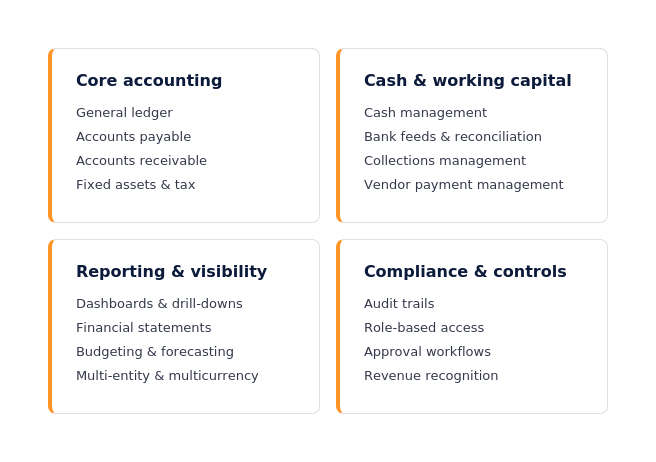
Most mid-market ERP systems provide a similar foundation of accounting capabilities. However, systems with comparable feature lists may differ significantly in workflow design, automation, reporting flexibility, controls, integration, and ease of use. Buyers should therefore evaluate how each capability works in practice—not only whether it appears on a checklist.
Core Accounting
- General Ledger (GL): The foundation of all financial reporting, a well-designed GL records every financial transaction, including sales, expenses, purchases, assets, liabilities, and equity. This empowers you to create accurate financial statements. The right finance module will support multiple account segments, parent and subsidiary accounts, and allocation tools.
- Accounts Payable (AP): AP features manage vendor invoices, payment schedules, and supplier relationships. Modern AP capabilities may include invoice automation, approval routing, early-payment discount tracking, and audit trails that maintain a history of invoice and payment activity. The system should also apply appropriate controls to corrections, reversals, and other changes after posting.
- Accounts Receivable (AR): AR features track what customers owe the business, automate invoicing, and manage collections. Effective AR capabilities help finance teams track outstanding balances, prioritize collection activity, and automate appropriate customer communications. These capabilities can support efforts to reduce days sales outstanding (DSO) and improve cash flow.
- Fixed Assets: Fixed assets features manage the full lifecycle of capital assets, including acquisition, depreciation, transfers, and disposal. This keeps balance sheets accurate and supports asset-related reporting during close, audit, and year-end processes.
- Tax Management: ERP-based tax management can automate tax calculations and reporting across applicable jurisdictions. Buyers should evaluate whether the system supports their required tax rules, integrations, reporting formats, and regulatory-update processes.
- Period-End Management: Period controls, recurring and reversing entries, reconciliation support, and close-related workflows help finance teams complete and document period-end activities consistently.
- Allocations: Allocation tools distribute shared costs, revenue, or other amounts across departments, entities, projects, products, or other financial dimensions according to established rules.
Cash and Working Capital
- Cash Management: Cash management features provide real-time visibility into liquidity, cash inflows and outflows, and fund transfers across bank accounts. Strong cash management capabilities include bank reconciliation, foreign currency account management, and cash flow forecasting.
- Bank Feeds and Reconciliation: The finance module should connect directly to bank accounts to import transactions automatically, reducing manual entry and improving reconciliation accuracy.
- Collections Management: These capabilities support the full collections process, from generating customer statements to tracking outstanding receivables and managing disputes.
- Vendor Payment Management: The finance module should be able to automate payment runs, track prepayments and discounts, and manage the payables close schedule.
Reporting and Financial Visibility
- Financial Dashboards and Drill-Downs: Role-based dashboards give executives, controllers, and analysts a real-time view of key performance indicators (KPIs) without requiring custom report builds. Drill-down capability lets users move from a summary view to the underlying transaction quickly.
- Financial Statements: The system should generate standard financial statements, including income statements, balance sheets, and cash flow statements, directly from posted data.
- Budgeting and Forecasting: FP&A teams need tools to create, manage, and update budgets and rolling forecasts without leaving the ERP platform. Integration between actual results and forecast models reduces the manual work of maintaining spreadsheet-based models.
- Multi-Entity Consolidation: For organizations with multiple companies or subsidiaries, the finance module should consolidate results to a corporate chart of accounts with minimal manual intervention.
- Multicurrency Management: This feature supports transactions in multiple currencies, applies current exchange rates, and provides reporting in the organization’s preferred currency. Buyers should evaluate how the system manages exchange rates, realized and unrealized gains and losses, account revaluation, and financial reporting across currencies. Acumatica, for example, supports multicurrency transactions and related currency-management processes.
- Intercompany Accounting: Organizations with related entities should evaluate how the system records, balances, reconciles, and eliminates intercompany transactions during consolidation.
Compliance and Internal Controls
- Audit Trails: The system should maintain a traceable history of financial transactions and relevant changes, including who performed an action and when it occurred. Posted transactions should be protected through appropriate permissions, period controls, and controlled correction or reversal processes. These records support internal review and external audit activities.
- Role-Based Access Controls: Users should only be able to see and modify the data relevant to their roles. Configurable permission settings reduce the risk of unauthorized access or inadvertent errors.
- Approval Workflows: Automated approval routing for invoices, purchase orders, expense reports, and other financial documents helps reduce unauthorized activity and supports consistent application of internal policies.
- Revenue Recognition: For organizations with recurring revenue, subscriptions, service contracts, maintenance agreements, or other contract-based revenue models, the module should support deferred revenue accounting and revenue recognition requirements, like ASC 606 and IFRS 15. Acumatica supports recurring revenue management, including recurring billing and contract-based billing models, and calculates deferred revenue based on established schedules with automatic posting to financial statements.
- Segregation of Duties: Permission and approval structures should help organizations separate incompatible responsibilities, such as entering vendors, approving invoices, and releasing payments.
When Should a Business Upgrade Its Financial Management System?
A business may need to upgrade its financial management system when manual processes, disconnected data, limited reporting, or growing operational complexity begin to affect accuracy, efficiency, visibility, or control.
Some common signals that a finance ERP upgrade is overdue include:
- A slow month-end close: If close consistently takes too long and inhibits timely decision-making, manual processes, inefficient workflows, and disconnected data may be contributing factors.
- Conflicting reports across departments: When sales, operations, and finance are working from different numbers, no one can make a fully informed decision.
- Heavy reliance on spreadsheets: Spreadsheets remain useful for analysis, but excessive reliance on them for essential accounting processes can indicate that the core financial system no longer supports the organization’s needs.
- Limited cash visibility: If your cash position can’t be viewed across all accounts in real time, working capital management becomes reactive rather than proactive.
- Growing audit burden: Manual controls are harder to document and defend. As compliance requirements grow, the risks of manual maintenance rise sharply.
- Added complexity the system was not designed to handle: New business entities, international transactions, project-based billing, subscription revenue models, and inventory expansion all stress systems that were not built to accommodate them.
If several of these resonate, it is worth evaluating a modern ERP solution for finance teams built to support your next stage of growth. Use the checklist below to keep track of your business’s growing pains:

ERP Finance Module Requirements and Selection Checklist
Before evaluating ERP products, document your organization’s current requirements, expected growth, operational dependencies, and implementation constraints. Then use a consistent checklist to compare how well each system supports those requirements.
The following checklist covers the areas most critical to SMB finance leaders.
| Capability Area | What to Evaluate |
| Core Accounting Fit | Does the system support your chart of accounts structure, revenue model, and reporting requirements? |
| Multi-Entity and Intercompany | Can it handle multiple companies, intercompany transactions, and consolidated reporting? |
| Multicurrency | Does it support transactions in multiple currencies and provide accurate exchange rate management? |
| Automation | Does it automate AP, AR, bank reconciliation, and period-end processes? |
| Tax Management | Does it support tax compliance across your relevant jurisdictions, including automated updates? |
| Revenue Recognition | Can it handle deferred revenue, ASC 606 or IFRS 15 compliance, and contract-based billing? |
| Reporting and Dashboards | Does it provide real-time financial dashboards, drill-down reporting, and standard financial statements out of the box? |
| Budgeting and Forecasting | Can FP&A teams build and update forecasts within the system, connected to actuals? |
| Integration | Does the finance module connect natively to procurement, inventory, payroll, and project management, or does it require custom integrations? |
| Compliance Controls | Does the system provide audit trails, role-based access, and approval workflows that support internal controls? |
| Scalability | Can the system grow with your business, supporting new entities, users, and transaction volumes without major re-implementation? |
| Cloud Deployment | Is the system cloud-native, providing anytime access, automatic updates, and reliable uptime? |
| Security | What security standards does the platform support? (For example, Acumatica runs on Amazon Web Services and supports SOC 1, SOC 2, SOC 3, HIPAA, PCI DSS, etc.) |
| Artificial Intelligence | Does the system use embedded AI for insights, anomaly detection, document recognition, user assistance, and activity orchestration? |
| Total Cost | Does the pricing model align with your growth plans, avoiding per-user fees that penalize expansion? |
| Implementation Support | What implementation, training, and ongoing support resources are available? |
Questions to Ask Before Choosing Financial Management ERP
Before booking a demo, finance, operations, IT, and executive stakeholders should align on the answers to the following questions.
- What are the top three manual processes that consume the most time in our current close cycle?
- How many legal entities, currencies, or tax jurisdictions do we currently operate in, and how many do we expect to add in the next three years?
- What compliance requirements are we currently managing, and which ones are creating the most risk?
- Where do conflicting numbers most often emerge between departments, and what is the root cause?
- How can we leverage artificial intelligence and machine learning to streamline and automate financial workflows and business processes?
- How long does our current month-end close take, and what are the primary bottlenecks?
- What level of reporting flexibility do we need, and who in the organization needs access to financial data?
- How does our current system connect, or fail to connect, finance to operations?
- What is our plan for implementation: phased rollout, full deployment, or a hybrid approach?
These questions help teams evaluate ERP applications against real business needs rather than feature lists in isolation.
An ERP provider should address these questions clearly and demonstrate how its financial management capabilities apply to your organization’s requirements. Buyers should ask to see important workflows during the demonstration rather than relying solely on a feature list.
Acumatica Cloud ERP is designed for growing small and mid-market businesses and connects financial and operational data on a single cloud-based platform. Its consumption-based licensing model is based primarily on the resources and transaction volumes used rather than the number of individual users.
How Does Acumatica Support ERP Financial Management?
Acumatica Financial Management connects accounting data with purchasing, sales, inventory, projects, payroll, customer management, and other business processes on a unified cloud ERP platform. Finance teams can access supporting transactions from financial reports and dashboards, helping them understand not only what changed but also which business activity produced the result.
Acumatica supports core accounting, cash management, fixed assets, tax management, deferred revenue, recurring billing, reporting, budgeting, multicurrency transactions, and multi-entity requirements. Available capabilities depend on the organization’s configuration, product edition, location, and implementation.
Because every business has different reporting, compliance, and operational requirements, buyers should evaluate these capabilities through workflows that reflect their actual processes.
Choosing the Right ERP Finance Module
The right ERP finance module should do more than record accounting transactions. It should connect finance with the operational activity behind those transactions, give decision-makers timely access to reliable information, and support the organization’s controls and growth plans.
Before selecting a system, identify the financial processes creating the most manual work, reporting delays, or risk. Prioritize your requirements, involve finance and operational stakeholders, and ask providers to demonstrate how critical workflows function in practice.
Explore how Acumatica Financial Management connects accounting, reporting, cash management, and operational data on a unified cloud ERP platform.
Frequently Asked Questions
What is an ERP finance module?
An ERP finance module is the part of an enterprise resource planning system that manages accounting and financial processes. Common capabilities include general ledger, accounts payable, accounts receivable, cash management, budgeting, reporting, fixed assets, tax management, revenue recognition, and financial controls.
What are the main features of an ERP finance module?
Essential ERP finance module features typically include general ledger, accounts payable and receivable, cash and bank management, financial reporting, budgeting, fixed assets, tax management, audit trails, approval workflows, and role-based access. Organizations with more complex requirements may also need multicurrency, multi-entity consolidation, intercompany accounting, and revenue recognition.
How is an ERP finance module different from accounting software?
Accounting software primarily records and reports financial transactions. An ERP finance module connects those transactions with purchasing, sales, inventory, payroll, projects, and other operations. This provides broader visibility and reduces the need to transfer information manually between separate systems.
What are the benefits of ERP for financial management?
ERP financial management can centralize data, reduce duplicate entry, automate repetitive workflows, improve reporting, strengthen financial controls, and provide better visibility into cash and business performance. The results depend on the selected system, implementation quality, data governance, and the organization’s processes.
When should a business consider a new ERP finance system?
Common signs include a slow close, conflicting departmental reports, excessive spreadsheet dependency, manual reconciliations, limited cash visibility, disconnected applications, and difficulty supporting additional entities, currencies, locations, projects, or transaction volumes.
How should a business choose an ERP finance module?
Start by documenting accounting, reporting, compliance, integration, scalability, and implementation requirements. Prioritize the capabilities that are essential for launch and ask ERP providers to demonstrate those workflows using realistic business scenarios. Buyers should also evaluate usability, security, deployment options, support, and total cost.


