
 Canada (English)
 Colombia
 Caribbean and Puerto Rico
 Ecuador
 India
India
 Indonesia
 Ireland
 Malaysia
 Mexico
 Panama
 Peru
Peru
 Philippines
 Singapore
 South Africa
 Sri Lanka
 Thailand
 United Kingdom
 United States
 AcumatiCares


Account reconciliation helps finance teams verify that account balances are accurate, complete, and supported by appropriate records. When balances differ, the team investigates whether the difference results from an error, a missing transaction, or a valid reconciling item, such as a payment that has not yet cleared.
Reconciliation is both a financial close task and an important internal control. It helps prevent errors from carrying into future periods, provides support for financial statement balances, and gives reviewers and auditors a clear record of how those balances were validated.
Connected ERP software can improve the process by linking the general ledger with subledgers, source transactions, supporting documents, approval workflows, and financial reports. This article explains the account reconciliation process and how growing finance teams can make it more accurate, consistent, and scalable.
Key Takeaways:
- The account reconciliation process verifies that GL balances are accurate, complete, and supported by independent records.
- Common reconciliation types include bank, accounts receivable, accounts payable, inventory, fixed assets, intercompany, and prepaid expense accounts.
- Poor reconciliation practices lead to delayed closes, audit stress, and inaccurate financial reporting.
- Manual spreadsheet-based reconciliation creates version control risks and limits reviewer visibility as transaction volumes grow.
- A connected ERP system links GL activity to subledgers, source documents, and approval workflows, making it easier to trace balances and catch exceptions early.
- Finance leaders evaluating ERP solutions should assess reconciliation as part of the broader financial close, not as a standalone accounting task.
What Finance Leaders Should Know About Reconciliation
Account reconciliation is the process of comparing an account’s general ledger balance with supporting records to determine whether the balance is accurate and complete. Supporting records may include bank statements, subledger reports, invoices, receipts, asset registers, amortization schedules, or records from another business entity.
If the records do not agree, the finance team investigates the difference. Some differences result from errors, such as duplicate entries or transactions posted to the wrong account. Others are valid reconciling items, such as outstanding checks, deposits in transit, or transactions recorded in different periods.
A reconciliation is complete when errors have been corrected and every remaining difference has been identified, supported, and explained. The completed reconciliation should also show who prepared and reviewed it and when those reviews occurred.
Reconciliation is especially important for balance sheet accounts because their balances carry forward from one accounting period to the next. An unresolved error can therefore affect multiple periods and reduce confidence in financial reporting.
What Are the Main Account Reconciliation Methods
Finance teams generally use document review, analytical review, or a combination of both methods.
Document review compares an account balance or individual transactions with supporting records, such as bank statements, invoices, receipts, subledgers, or account schedules. This method provides transaction-level evidence that recorded activity is complete and accurate.
Analytical review compares an account balance with an expected amount based on historical results, budgets, forecasts, ratios, or operational activity. A significant or unexpected variance prompts further investigation.
Document review provides detailed verification, while analytical review helps identify unusual balances or trends that may require closer attention. The appropriate method depends on the account’s financial significance, activity, available supporting evidence, and level of risk.
What Are the Different Types of Account Reconciliation?
| Reconciliation Type | Records Compared | Common Differences |
|---|---|---|
|
Bank |
General ledger cash account and bank statement | Outstanding payments, deposits in transit, bank fees, and missing transactions |
|
Accounts Receivable |
AR control account and customer subledger | Unposted invoices, credit memos, payments, and write-offs |
|
Accounts Payable |
AP control account and vendor subledger | Missing bills, duplicate invoices, credits, and unrecorded payments |
|
Inventory |
GL inventory balance, inventory records, and physical counts | Shrinkage, costing errors, damaged goods, and unrecorded movements |
|
Fixed Assets |
GL balances and fixed asset register | Missing acquisitions, disposals, depreciation, and classification errors |
|
Prepaid Expenses |
GL balance and amortization schedule | Incorrect expense recognition or incomplete amortization |
|
Accrued Liabilities |
GL balance and supporting accrual schedule | Missing, duplicated, outdated, or incorrectly reversed accruals |
|
Intercompany |
Balances recorded by related entities | Timing, currency, classification, and amount differences |
The appropriate reconciliation depends on the account and the records available to support it. Some accounts can be verified against an external statement, while others require comparison with an internal subledger, schedule, physical count, or corresponding balance recorded by another entity.
How the Account Reconciliation Process Works Each Period
The account reconciliation process follows a consistent sequence:
- Identify the account and reconciliation period. Confirm which general ledger account is being reconciled and the period under review. For accounts that carry balances forward, verify that the opening balance agrees with the prior period’s approved closing balance.
- Gather supporting records. Collect the statements, subledger reports, invoices, schedules, receipts, transaction details, and other records needed to support the account balance.
- Compare balances and transactions. Compare the general ledger balance with the supporting balance. Where transaction-level matching is required, compare corresponding amounts, dates, descriptions, and reference numbers.
- Identify reconciling items. List every difference between the records. Common reconciling items include timing differences, missing transactions, duplicate entries, incorrect amounts, and transactions posted to the wrong account or period.
- Investigate the cause of each difference. Determine whether the difference is an accounting error that requires correction or a valid timing difference that should remain temporarily as a documented reconciling item.
- Record necessary adjustments. Post correcting or adjusting entries for confirmed errors. Each adjustment should include appropriate support and follow the company’s journal-entry approval process.
- Document the completed reconciliation. Record the balances compared, supporting documents reviewed, reconciling items identified, adjustments made, and final reconciled balance. Unresolved items should include an owner and expected resolution date.
- Review and approve the reconciliation. A reviewer should confirm that the supporting records are complete, adjustments are appropriate, remaining differences are explained, and the final balance is reasonable.
What Is an Example of Account Reconciliation?
Suppose a company’s accounts receivable subledger shows that customers owe $24,800, while the accounts receivable control account in the general ledger shows a balance of $25,300. The reconciliation therefore begins with a $500 difference.
During the review, the finance team discovers a $500 customer credit memo that was recorded in the accounts receivable subledger but had not been posted to the general ledger. After the credit memo is posted, both records show a balance of $24,800.
The completed reconciliation documents the two original balances, the cause of the difference, the correcting entry, the final reconciled balance, and the names and dates of the preparer and reviewer.

How Often Should Accounts Be Reconciled?
Reconciliation frequency should reflect each account’s transaction volume, financial significance, volatility, and risk. High-volume cash and payment accounts may require daily or weekly review, while many balance sheet accounts are reconciled monthly as part of the financial close. Lower-activity accounts may be reviewed quarterly if company policy and risk levels permit.
Finance teams should document the required frequency for every account and reconsider it when transaction volume, business complexity, unresolved differences, or reporting risk increases.

What Documentation Makes a Reconciliation Audit-Ready?
Audit-ready reconciliation documentation shows how the account balance was verified and how every difference was resolved or explained. The reconciliation should include:
- The account name, number, and reconciliation period.
- The general ledger balance.
- The supporting balance or records used for comparison.
- A list of reconciling items.
- The cause and status of each difference.
- Adjustments or journal entries recorded.
- Supporting documents.
- The final reconciled balance.
- Preparer and reviewer names and completion dates.
- Owners and expected resolution dates for outstanding items.
Supporting evidence may include bank statements, trial balances, subledger reports, invoices, fixed asset registers, amortization schedules, physical inventory records, and journal entries.
Attaching this evidence directly to the relevant transactions or reconciliation records makes it easier for reviewers and auditors to verify the work without requesting documents from multiple people or systems.
When Growing Companies Should Improve Reconciliation
A growing company should improve its account reconciliation process before it becomes a recurring financial-close bottleneck. Common warning signs include:
- Close cycles that regularly exceed their target.
- Recurring unexplained differences.
- Multiple spreadsheet versions maintained by different preparers.
- Missing or inconsistent supporting documentation.
- Audit findings related to unsupported balances.
- Increasing transaction volume.
- New entities, locations, currencies, or intercompany activity.
- Difficulty determining which accounts have been prepared and reviewed.
Reconciliation trigger moments
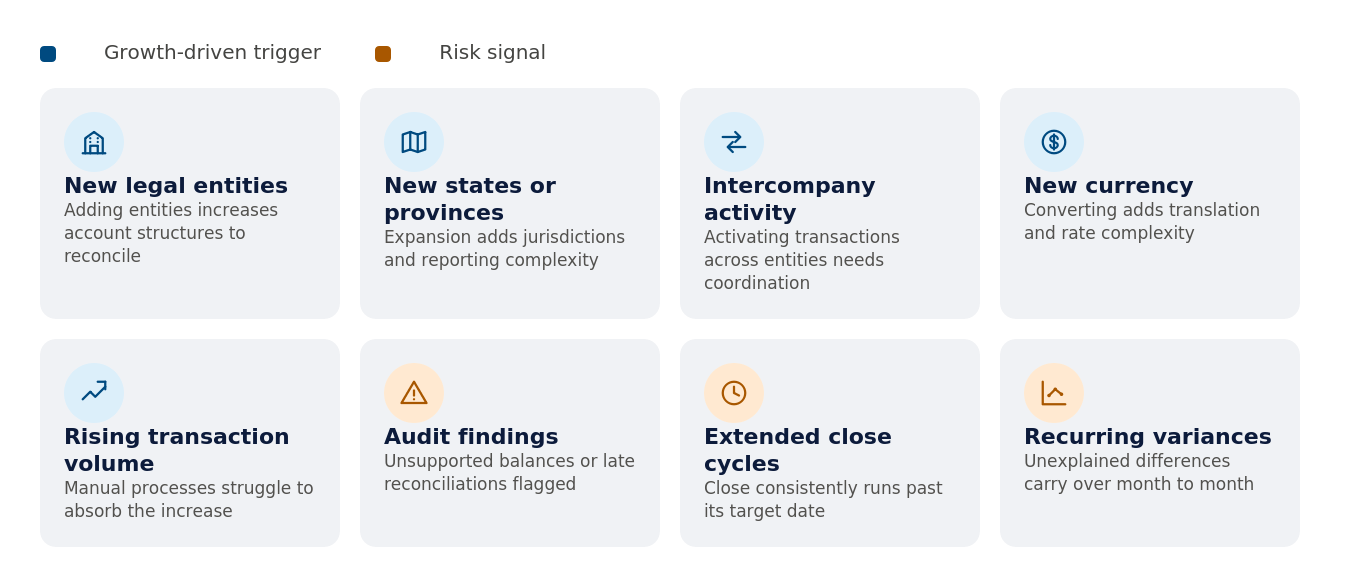
These conditions indicate that the existing process may no longer provide sufficient consistency, traceability, or reviewer visibility.
How Manual Reconciliation Creates Bottlenecks?
Manual reconciliation becomes slower and more error-prone as accounts, transaction volumes, and entities grow because each additional variable increases the complexity of a process that depends on human coordination and consistent execution.
Spreadsheet-based reconciliation introduces specific risks. Version control problems arise when multiple preparers work from different file copies. Inconsistent procedures lead to reconciliations that cannot be easily compared or reviewed. Missing support goes unnoticed without a clear checklist. And limited review visibility makes it difficult for controllers to confirm that all accounts have been completed. Duplicated effort is also common, with the same supporting data being manually gathered and formatted across multiple reconciliations each period. These challenges represent real control gaps that affect the reliability of financial reporting and the efficiency of the close.
How Enterprise Resource Planning Improves Account Reconciliation Workflows?
A modern enterprise resource planning (ERP) solution improves the account reconciliation process by connecting general ledger activity with subledgers, source transactions, reporting, documents, approvals, and user permissions in a single system. When these components are disconnected across separate tools or spreadsheets, finance teams spend significant time collecting data and making sure that data is accurate between systems before they can even begin reconciling accounts. A connected ERP solution eliminates that layer of disconnected data by ensuring that transactions posted in accounts payable, accounts receivable, payroll, inventory, or fixed assets flow directly into the GL with a traceable link back to the originating document.
Acumatica Cloud ERP supports reconciliation and financial-close activities by connecting the general ledger with financial subledgers, source transactions, documents, reporting, and financial controls. Relevant capabilities include:
- Flexible financial periods that can be kept open as long as needed for data entry.
- Reconciliation drill-down access from any GL balance directly to the original source document.
- Role-based access controls that protect sensitive data.
- Complete audit trails and financial controls that track every journal entry and user action.
- Configurable approval workflows for journal entries.
- Recurring transaction templates.
- Reporting dimensions that allow balances to be sliced by department, project, or any user-defined segment.
Together, these capabilities make it significantly easier to trace balances, investigate exceptions, and complete reviews with confidence.
Acumatica also supports exception-based reconciliation review through AI-powered anomaly detection, which can review posted transactions and surface potential mistakes before financial periods are closed. For bank and credit card reconciliation, Acumatica’s bank feed software can schedule transaction imports, use artificial intelligence and machine learning to match bank activity with Acumatica transactions, and highlight unmatched items for review.
How ERP Systems Support the General Ledger Process?
A modern ERP solution helps finance teams maintain a chart of accounts, record transactions, reconcile accounts, review trial balances, and produce financial statements from a single connected platform rather than across separate systems.
When control accounts and posting rules are configured appropriately, integrated subledger activity posts directly to the related general ledger accounts. This helps keep the subledger and general ledger aligned and reduces manual data transfers.
Integration does not remove the need to reconcile the balances. Finance teams should still verify that all relevant transactions were posted correctly, investigate exceptions, and document the completed review. The connected structure makes that verification more efficient and traceable as transaction volumes and entity counts grow.
Features That Matter Most in Reconciliation-Ready ERP
The features that matter most when evaluating an ERP solution for account reconciliation center on five outcomes: traceability, controls, efficiency, review discipline, and reporting confidence.
| Evaluation Area | Capabilities to Review | Why It Matters |
|---|---|---|
|
Traceability |
Drill-down from balances to transactions and documents | Helps preparers investigate discrepancies and demonstrate support |
|
Controls |
Role-based permissions, period controls, and journal approvals | Reduces unauthorized activity and supports segregation of duties |
|
Efficiency |
Subledger integration, templates, imports, and matching | Reduces repetitive data collection and manual comparison |
|
Review Discipline |
Status visibility, exception tracking, sign-off, and supporting documentation | Helps controllers determine whether reconciliations are complete |
|
Reporting |
Trial balances, dimensions, consolidation, and comparative reporting | Makes unusual balances and entity-level differences easier to identify |
Finance leaders should evaluate how effectively a system supports both preparers and reviewers. A system that makes balances easier to assemble but does not provide sufficient documentation, exception visibility, or review controls may simply move the bottleneck to a later stage of the financial close.
What Controls Reduce Reconciliation Risk and Rework?
Effective reconciliation controls separate the functions of recording activity, preparing reconciliations, and reviewing or approving them, with different individuals responsible for each step where staffing allows. This segregation of duties is a foundational principle in internal control frameworks and is particularly important for high-value or high-risk accounts.
Beyond segregation of duties, other controls that contribute to a more reliable close process include review workflows that require a documented sign-off, documentation standards that specify what support is required for each account type, period close controls that lock periods after approval, and exception tracking that flags unresolved items and identifies who is responsible for investigating them. The practical value of these controls is that they catch issues before financial statements are finalized, rather than during an audit or after a restatement. Earlier detection reduces rework, protects reporting accuracy, and strengthens the overall control environment.
How Can Finance Teams Improve Account Reconciliation?
Finance teams can reduce manual work in the account reconciliation process by standardizing procedures, prioritizing accounts by risk, reconciling high-volume accounts more frequently, using templates, attaching support directly to transactions, and using ERP workflows to automate recurring and repetitive tasks.
The goal is to ensure that finance professionals spend their time investigating exceptions and evaluating unusual items rather than collecting, formatting, and manually comparing data. Every hour spent gathering the same bank statement or reformatting the same subledger export is an hour not spent on analysis that will actually improve financial reporting quality.
ERP solutions reduce this manual overhead through:
- Connected data that eliminates redundant exports.
- Drill-down reporting that makes exception identification faster.
- Recurring transaction templates that handle predictable journal entries automatically.
- Approval workflows that route completed reconciliations for review without requiring manual coordination.
Standardizing procedures across preparers also reduces inconsistency, which is a common source of rework when reconciliations completed differently in one period cannot be easily compared to the prior period.
A Practical Reconciliation Improvement Checklist
A structured approach to reconciliation improvement starts with identifying which accounts carry the highest risk or volume and ensuring those accounts receive the most frequent attention and the clearest documentation standards.
Use the following checklist as a practical starting point:
- Identify high-risk and high-volume accounts and define their reconciliation frequency.
- Define preparer, reviewer, and approver responsibilities clearly for each account type.
- Standardize required support by account type, specifying which documents must be attached for a reconciliation to be considered complete.
- Connect subledger and GL reporting where possible to reduce manual balance comparisons.
- Track unresolved items and their aging so that open items do not carry forward without explanation.
- Use AI-assisted anomaly detection and intelligent transaction matching to prioritize exceptions, while keeping preparer and reviewer judgment, documentation, and sign-off in place.
- Use ERP workflows and audit trails and financial controls to support structured review and create a defensible record of the close process.
Implementing this checklist within a connected ERP solution, rather than across separate spreadsheets or disconnected software, significantly improves both the consistency of execution and the visibility available to reviewers and controllers.
How Should Businesses Evaluate ERP Software for Account Reconciliation?
Businesses evaluating ERP software should review account reconciliation as part of the complete financial-close workflow. Reconciliation depends on how effectively the general ledger, subledgers, source documents, journal entries, approvals, reporting, and period controls work together.
During an ERP evaluation, finance leaders should determine whether users can:
- Trace general ledger balances to originating transactions.
- Compare general ledger and subledger activity efficiently.
- Attach and retrieve supporting documents.
- Control journal entries and financial periods.
- Separate preparer, reviewer, and approval responsibilities.
- Identify exceptions and unresolved differences.
- Review activity across multiple entities and currencies.
- Maintain a clear audit history.
Acumatica Cloud ERP connects financial management, operational transactions, reporting, and configurable controls in one platform for small and mid-market businesses. This connected structure can help finance teams reduce manual reconciliation work while maintaining the review, documentation, and professional judgment required for reliable financial reporting.
Frequently Asked Questions
What is the account reconciliation process, and why does it matter for small and mid-market companies?
The account reconciliation process is the systematic comparison of internal general ledger balances against independent supporting records, such as bank statements, subledger reports, invoices, and schedules, to verify that balances are accurate and complete. For small and mid-market companies, reconciliation matters because it is both a financial close task and an internal control that supports audit readiness, accurate reporting, and stakeholder confidence. Poor reconciliation practices lead to delayed closes, undetected errors, and financial statements that cannot be relied upon for decision-making.
What are the steps in the account reconciliation process?
The process generally involves identifying the account and period, confirming the opening balance, gathering supporting records, comparing balances and transactions, investigating differences, recording necessary adjustments, documenting reconciling items, and completing an independent review and approval.
What is a reconciling item?
A reconciling item is a difference between two financial records that must be corrected or explained. It may result from an error, a missing transaction, or a valid timing difference, such as an outstanding check or deposit in transit. A reconciliation is complete only when every remaining difference is supported and documented.
What is the difference between account reconciliation and bank reconciliation?
Account reconciliation is the broader process of verifying any general ledger account against supporting records. Bank reconciliation is one type of account reconciliation that specifically compares a company’s cash records with its bank statement.
How often should accounts be reconciled?
Reconciliation frequency should reflect the account’s transaction volume, financial significance, volatility, and risk. High-volume cash accounts may require daily or weekly review, while many balance sheet accounts are reconciled monthly. Lower-activity accounts may be reviewed quarterly if company policy and risk levels permit.
How does ERP software support account reconciliation?
ERP software supports account reconciliation by connecting the general ledger with subledgers, source transactions, supporting documents, reporting, and approval controls. It can reduce manual data gathering, make discrepancies easier to trace, and provide a clearer audit history. Finance teams must still investigate exceptions, approve adjustments, and confirm the final balance.


